
When you want to see them score, use VBallScore!
How to use VBallScore
Watch · Score · Stream · Record — all from your phone. No app store, free to start.
Watch · Score · Stream · Record — all from your phone. No app store, free to start.
Someone texted you a link. Here's everything the watch screen can do — no account needed.
A watch link looks like vballscore.com/m/CODE or a scorekeeper's name link like vballscore.com/theirname. Tap it and you're in — no account, no install, no app store.
The live score always shows. Live video appears when the scorekeeper is streaming. The score keeps working even if video isn't on.
On the score area:
Your reactions float up the screen on every device watching — including the scorekeeper's. It's how the whole family cheers together.
The eyeball number is everyone watching: people in the app plus YouTube's own viewer count when the broadcast is live (YouTube reports its count with a short delay). Tap the viewers / eyeball area to see who's watching, with the YouTube crowd on its own row. If you're signed in, you can also send the scorekeeper a quick message — "great dig!" or "can you flip the camera?". Guests can read chat but can't send.
There's a quality picker — Auto / High / Medium / Low — plus a little signal-strength meter that grades your incoming feed. If video stutters, drop it to Medium or Low. The score is never affected.
While video is live, tap Record to Device to save the broadcast to your own phone — with the score overlay burned in and every point marked as a chapter. On phones it saves through the share sheet (iPhone → Photos); on a computer it downloads. See Recording & chapters.
The Find or Start a Match page lists live matches without loading Google Maps. If you allow location, nearby matches move to the top and show their distance; your device location is enough for that. Tap Open match map only when you want pins (gold means score-only, red means live video). The blue dot is you, and Find my match jumps to a match you are scoring.
When starting a match, select a venue suggestion, tap Use my current location, or tap Choose or adjust on map to confirm its location. A typed name alone cannot put the match on the map. Choosing a venue suggestion does not require opening the map. Scoring an existing match is unchanged.
Video seats are limited (the score never is). If you see "Live video is full," the live score still updates for everyone and a seat may open up.
Run the match from a phone or tablet for free. Casual matches allow guest scoring; tournament scorers sign in and must be assigned.
From the home screen → Watch or Live Stream a Match → pick teams + court → start.
With the camera off you get two big team-colored boxes: tap the + button in the top corner for +1, the − button in the bottom corner for −1 — they're big square targets. With the camera on, use the + / − on the floating bar, or tap the score number itself to add a point (it's the biggest target, so you don't fat-finger it). Tapping anywhere else on a score box sends a ❤️ cheer, not a point.
Every point you add shows a gold +1 rising from the number; a removed point shows a coral −1 falling — so you always know the tap registered, even in bright sun.
Made a mistake? The ↶ Undo button (in the End-set / End-match group) cleanly reverses your last scoring action — including the serve and which team it went to — unlike the plain −, which just drops one team's score.
Pinch to zoom the lens (it zooms the real video everyone sees, not the page). There's a flip button for front/back camera. Film in landscape (sideways).
For a casual match, pass the scorekeeper role to another phone — the new device accepts and you're done. If you walk away, a watcher can Take over scoring. You can take it back with the green take-back / reclaim button. In tournaments, only assigned referee/work-team scorers or director-approved replacements can score. The director uses Assign scorer in the tournament's Games or Active Match tab when someone needs replacing; spectators cannot take over.
Got logged out or lost your match? Sign back in — a gold ↩ Resume scoring banner appears, and your live matches show under Active matches on your My Account page (tap your avatar; from a match screen, avatar → Open full profile). The home page also shows a "match in progress" banner.
Put a phone on a tripod to film the court and keep scoring from the phone in your hand. Open your avatar → account sheet → Options → Camera → Use another device as the camera, then scan the QR with the other device — it becomes a courtside camera while you score.
You can pair up to 3 courtside cameras at once (plus your own phone — four angles in all) — e.g. one at each end and one at the net. Give each a name (tap the ✎ pencil) like "Home bench" or "Net cam" so you know what you're cutting to.
Tap the camera button any time to open Choose camera and cut the live feed to any angle — your phone, or any paired camera — mid-rally. Only one camera streams at a time, so extra cameras don't add any streaming cost; switching hands the broadcast cleanly from one to the next. You can always take the video back to your own phone.
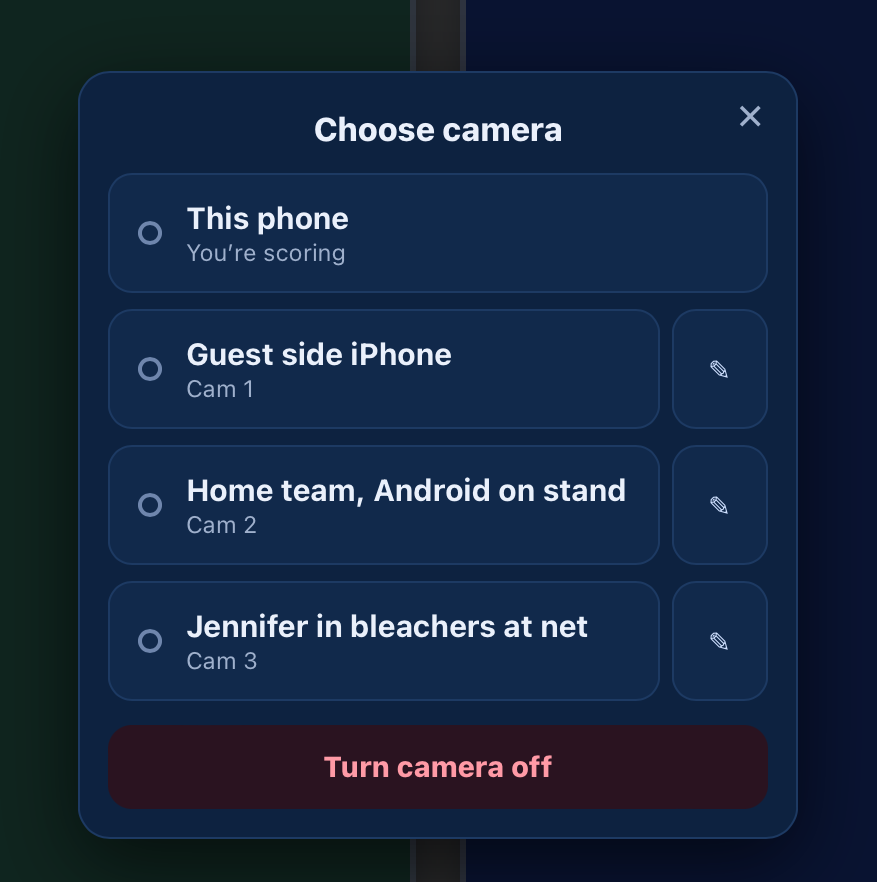
Multiple cameras need a Family or Pro plan with streaming time left — if your balance is used up or expired, extra cameras stop working until you top up.
The score IS the video timeline — find any point in a 2-hour match in two taps. This is the part nobody guesses, so here's the whole thing.
Tap Record to Device while the camera is on. It saves the video on your phone with the live score and the VBALLSCORE watermark burned in. Nothing is uploaded — there's no cloud fee, it's yours and stays private.
While you record, a safety copy is kept on the device every couple of seconds. If the app crashes, is force-closed, or the phone dies mid-recording, reopen the same match — a banner offers to save the rescued video (with its chapters) instead of losing the whole recording.
Honest limits: the rescue is best-effort. If the device is very low on storage the safety copy steps aside so the main recording can finish, and on iPhone/iPad, Safari may clear site data after about 7 days of not visiting — so save a rescued recording (and your normal recordings) to Photos promptly rather than leaving them parked in the browser.
While you record, each score change, set end, and match point is stamped on the timeline. The Record pill flashes "✓ N chapters" as each one lands, so you know it's working.
While recording, tap the floating ⭐ — or just double-tap the video — to bookmark a great play (about one per 2 seconds). Both only work while you're recording — if you're live-streaming without recording, there's no video to bookmark. The app keeps the few seconds before your tap too, because the play happens just before you react. Stars become chapters — gold ★ markers on the playback timeline and chapter list — so you can jump straight to your starred moments later (and pick them for a highlight reel).
Tap the labeled ⏸ Pause rec button (next to the Record control) to pause recording — tap again to resume. Paused time is cut out: the saved video and all chapter times skip it. Stop is on the "Recording to device m:ss" pill. (Watchers recording on their own device get a ⏸ Pause next to their Recording pill too.)
Streaming live and need a break — a timeout, a between-sets huddle? Tap ⏸ Pause live: the broadcast pauses, your banked streaming time stops counting down, and viewers see a calm "the scorekeeper paused — it'll come back automatically" message (the score keeps updating). Tap Go Live to resume; viewers reconnect on their own, nothing for them to do.
Tap Leave while you're still recording and the app checks first — "You're still recording" — with three choices:
Either way the footage isn't thrown away — it lives on your device until you delete it.
Tap your avatar (top-right) → account sheet → Options → Review last recording. The built-in player shows a chapter rail of every point with the score at that moment. Tap any point to jump the video there, or drag the scrub bar — your ⭐ moments stand out with a ★ in the rail.
Recorded matches you're signed in for also show in My Account — open the match and the reel is right there. Recordings stay on your device until you delete them; deleted ones sit in Recently deleted for 30 days in case you want them back.
Turn the best plays into one short video you can text to grandma — made entirely on your phone.
After recording, open the recording — reel selection is already open, with every play checked. Uncheck the plays you don't want (your ⭐ moments are easy to find), then tap Create reel ▶. The app trims and stitches them into one video right on your phone — no uploading the whole match, no waiting, no per-clip fee.
Highlight reels are free and unlimited on every plan — make as many as you like.
If a match was recorded in several pieces — you paused and resumed, switched apps, or used a second camera — the app finds all of this match's clips on your device and auto-combines them into one reel, in order. You'll see a quick "Combined N clips into one reel" note. No importing, no lining clips up by hand.
Recording courtside on your phone? You don't have to build the reel on that little screen. Your chapters and starred moments save to your account the moment you record — the video stays on your phone.
Later, on a PC or Mac: sign in, open the match, and your chapters are already waiting. Copy the video over from your phone (a cable, a cloud drive, or email it to yourself), tap Load video file(s), pick it, and cut the reel on the big screen. The app even tells you the exact file to look for — its name has the match code in it.
We never upload your video — that's what keeps it free and your footage private on your own devices. The only manual step is moving the file from phone to computer.
The scoreboard is always free for everyone. Plans only change the video.
🎁 Try before you buy: free streaming not working for your viewers? The first time you go live from a match, VBallScore offers a free 2-minute trial of the paid HD stream — make sure the HD you'd be buying works from your real court before you pay for any plan.
▶️ YouTube Beta: Family and Pro buy VBallScore HD streaming time. Optional YouTube relay depends on your channel being eligible for live streaming and available YouTube API capacity; it may be unavailable. When live, it uses the same streaming hours, with no separate YouTube fee. The scoreboard is burned in, and the in-app viewer limit does not apply to YouTube viewers. Set it up from the match’s YouTube control. The first time, connect your YouTube channel and approve VBallScore’s YouTube permission, then confirm the title, description, and privacy. To change who can watch while you are live, tap the Unlisted / Public chip beside the YouTube link and save — it changes the broadcast that is running; a new title or description applies to your next broadcast. If anything misbehaves, tell us from Account › Support and include the match ID.
To disconnect your channel: Account › YouTube connection › Disconnect YouTube. Stop YouTube streaming in active matches first. This removes the connection's stored YouTube details and replay links from VBallScore, but does not delete videos on YouTube, match scores, local recordings or reels.
Family and Pro come with a bank of streaming time that only counts down while you're actually live — not wall-clock. Unused time is good for 90 days (3 months), then it expires — it works across as many matches as you want, and you can top up your streaming time anytime from My Account. Purchases are non-refundable. The LIVE pill shows your remaining time while you stream, and you can always drop back to free mid-match instead of buying more.
Pay with Apple Pay, Google Pay, or card.
Some venue WiFi blocks phone-to-phone (free) video, and some viewers' phones/cars can't load it. When that happens the app says so and suggests upgrading — Family/Pro stream through a relay that usually gets through where free can’t — cellular, locked or guest venue WiFi. The scoreboard itself always works for everyone, free.
Set up match alerts once on the device where you want to receive them.
Tap a match notification to watch. To stop following one person's matches, turn off their gold star; you stay friends.
To see who follows you, open Account → Friends → Followers. Only you can open your followers list. Follow back follows that person's matches; Following lets you stop. Friends means an accepted friendship, not just a follow. People you follow can see you in their own Followers list; following does not send them an announcement.
No notification? Open Account → Friends and tap Watch beside their handle. Use the copy-link icon beside Watch to save or share their watch link. The same link works for future matches, even if their handle changes. Unlisted matches are not listed through watch links.
To remove someone, go to Account → Friends, tap the person-minus icon beside their star, then confirm. The person and conversation disappear from your view on all your devices, and their messages and match alerts stop. You can add them again later.
Tap the ☆ next to a signed-in person's name in a match's viewer list to follow them. Find them under Account → Friends → People, where a LIVE link opens their current match. Match and message alerts also need notifications enabled on the receiving device. Follow the notification setup steps above.
It launches full-screen from the home icon. Need a walkthrough? Visit vballscore.com/install. New to watching? vballscore.com/watch is the 30-second parent quick-start.
Sign in with Google, Facebook, X, Microsoft, or your email (we send a one-time sign-in link — no password to remember). You can also add a passkey (Face ID / Touch ID) for one-tap sign-in next time.
Signing in gives you your own channel link (vballscore.com/your-name, set under Account → Your channel), saves your history, and lets you set a photo — pick an emoji or upload a picture. It shows next to your name everywhere, including while you score.
From the home screen, tap Tournaments, then + Start a new tournament, to open the Director Dashboard: divisions, teams, auto-assigned pools, generated round-robin schedules, brackets, player check-in, announcements, and a publish hub with a QR share card for the event. (Sign in with a director account first.)
A draft is free to build. Publishing costs a one-time flat $49 software/setup fee per tournament; it is not a subscription. VBallScore does not collect your team entry fees — teams pay you directly. One tournament supports up to 8 divisions, 200 teams, 50 roster members per team, and 500 generated schedule matches.
The public tournament page opens on Standings. Nearby tournament discovery uses device GPS and a list first; Google Maps loads only after someone explicitly opens a map.
Want the full walkthrough? Read the 📖 Director’s Guide — every setup step from a blank tournament to game day, print-friendly.
This is the account Directory importer: on the Teams page, open the Players tab and tap Upload players CSV to prestage club players. A Director Dashboard tournament has its own registration CSV template and review flow in the tournament's Teams step; see the Director’s Guide for those columns.
Start your file with a row of column headers to use any column order (extra columns are ignored). No header row? That works too — columns are read in this exact order: First Name, Last Name, Email, Gender, Club. Accepted header columns:
Name and Email are required for every row — rows without a valid email are skipped (email is the key that links each player to their account). The other columns are optional. Players can be marked for indoor, beach, or both.
The Email column is the key one: it pre-links a player to their VBallScore account. When that player later signs in with the same email, they're automatically connected to the roster you staged — so clubs and tournament directors can build rosters ahead of time and have them "just work" when players join.
Some devices or networks can't load the free phone-to-phone stream. Switch to HD (Family or Pro), which usually connects where the free stream can’t. The score always works regardless.
The chapters live in the app. Tap your avatar (top-right) → account sheet → Options → Review last recording to use them, jump between points, and make highlight reels.
Your chapters, stars, and timeline are saved to your account — only the video file stays on the device that recorded. To edit on a big screen: copy the video file to that computer (USB, a cloud drive, or email…), sign in on vballscore.com, open the match (or find it under My Account → Matches — its row shows a 🎬 icon), tap Load video file(s) and pick it — your chapters re-attach automatically.
Keep the original filename. Save the video to Files / Downloads, not the iOS Photos app — Photos strips the filename, which carries the match ID that links your chapters. If the name's gone, just open the match by its /m/<id> link on that computer and load the video there (the ID comes from the URL).
Sign back in. A gold ↩ Resume scoring banner appears and your live matches are under Active matches on your My Account page (tap your avatar; from a match screen, avatar → Open full profile).
Win a set → confetti. Win the match → the full show (fireworks, flying volleyballs). And there are hidden effects for the curious — try tapping the splash-screen wordmark five times. 😉
Tap your avatar → Report a bug / Contact support. You can attach photos or video, and replies come back to you in-app from VBallScore Support. The optional Include app diagnostics checkbox adds the device's bounded recent app/recording history; tap view to inspect it first or untick it. Or email support@vballscore.com.
A free web app for scoring volleyball matches and sharing them live — indoor and beach. Run the scoreboard from a phone or tablet, and anyone with the link follows every point as it happens. Turn on the camera and the same link becomes live video of the match with the score on screen: free phone-to-phone, or in HD on a Family or Pro plan, which can also send the stream, scoreboard included, to your own YouTube channel. Players keep the score without extra gear; families watch from anywhere; coaches record the match to their own phone, review every point and cut highlight reels afterward.
VBallScore began in 2014, when Kevin Ely — a Marine Corps veteran with an IT background and a longtime volleyball parent — built a phone app so families who couldn't make it to the gym could still follow the score. That first app ran on Android and iPhone until 2018. In 2026 he rebuilt it from scratch as a web app, adding live video, recording, highlight reels and tournament tools for clubs. It's still independent, and scoring and phone-to-phone live video streaming is still free.
It runs in your browser — nothing to download from an app store, and you can add it to your home screen so it opens full-screen like an app. The scoreboard is free for everyone; optional plans add higher-quality live video (see plans & pricing). Your recordings save on your own device — not uploaded; more on what we collect is on the Privacy page.